The color you see is never just the color in front of you.
Simultaneous contrast is the shift in perceived hue, lightness, or saturation that happens when colors sit next to each other. Same paint, same pixel value. Completely different appearance depending on what surrounds it.
Chevreul documented this in 1839. Seurat built a painting movement around it. UI designers still get blindsided by it daily.
This article covers what simultaneous contrast is, the retinal science behind it, its role in art history from Pointillism to Fauvism, and how to test for it in your own work, whether you paint or design on a screen.
What is Simultaneous Contrast
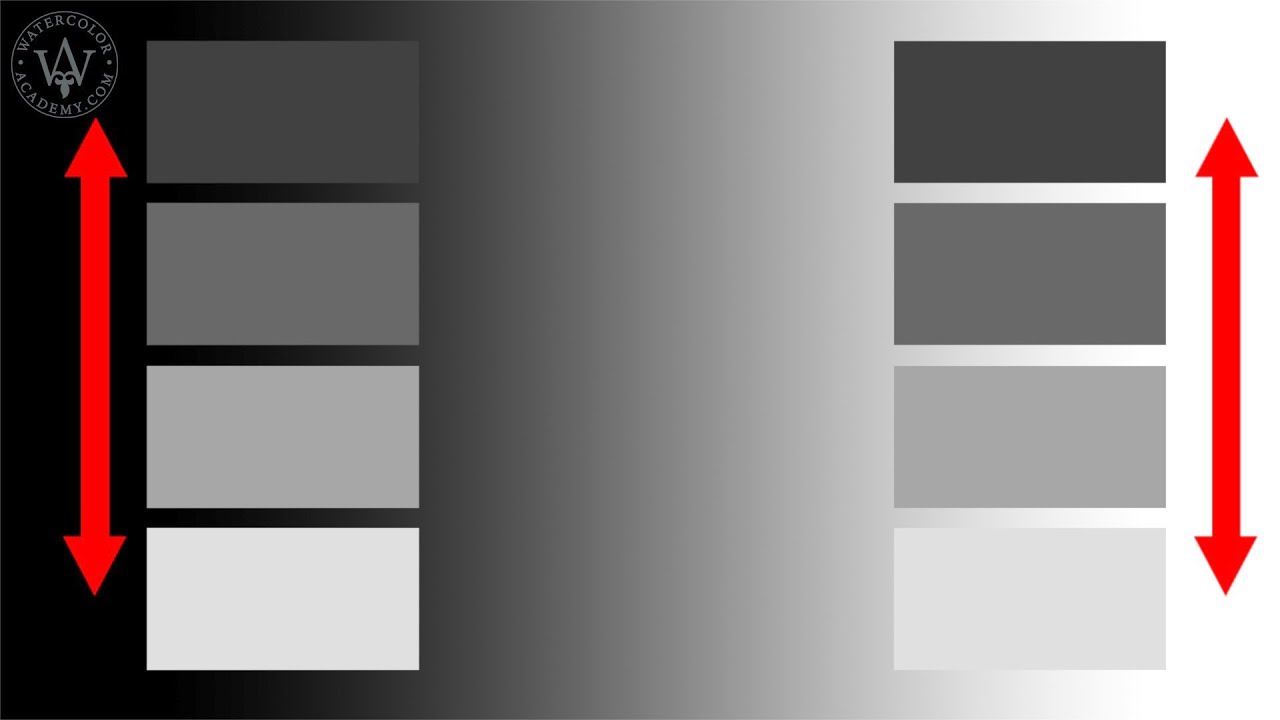
Simultaneous contrast is the change in a color’s perceived appearance caused by the colors surrounding it. A single patch of gray does not look the same on a white background as it does on a black one, even though the gray itself hasn’t changed at all.
This is not a trick. It is normal human vision. The visual system never processes a color in isolation. Every hue, lightness level, and saturation you perceive is the result of your eye comparing what it sees against its immediate context.
The effect applies across three dimensions of color:
- Hue contrast: a neutral gray takes on a slight warm cast next to cool blues, and a cool cast next to warm reds
- Lightness contrast: the same mid-tone reads lighter against a dark field, darker against a light one
- Saturation contrast: a muted color looks more vivid when placed next to a desaturated one
Understanding simultaneous contrast is foundational to color theory. It explains why color swatches picked in isolation consistently disappoint once applied in context, and why painters, UI designers, and textile makers have wrestled with the same perceptual shift for centuries.
The effect is distinct from successive contrast, which produces afterimages when you stare at one color and then look away. Simultaneous contrast happens in real time, side by side, all at once.
The Science Behind the Effect
Two mechanisms drive simultaneous contrast: lateral inhibition in the retina and the brain’s opponent-process color channels. Both work together, and neither is optional.
Research published in PMC confirms that lateral inhibition operates through retinal ganglion cells organized in an excitatory-center, inhibitory-surround pattern. When a photoreceptor fires in response to a stimulus, it simultaneously suppresses the response of neighboring cells. This sharpens edges and amplifies perceived differences between adjacent areas.
The result: your retina is actively exaggerating the boundaries between colors before the signal even reaches your brain.
Lateral Inhibition and the Retina
What it does: Retinal lateral inhibition functions as a contrast encoder. It creates stimulation contrast that increases sensory perception and amplifies the difference between a stimulated region and its periphery (MedCrave, 2019).
Horizontal cells and amacrine cells in the outer retina carry out this suppression. When adjacent photoreceptors are activated by a surrounding color, they send inhibitory signals back through horizontal cells to the central cone being stimulated. The central cone’s response gets pulled toward the opposite of whatever surrounds it.
That’s the mechanism behind why a gray next to red looks slightly green. The red-sensitive cones surrounding the gray patch are suppressing red signals at the boundary, pushing perception in the opponent direction.
Key finding: 2025 research from the National Research Council in Florence confirmed that simultaneous contrast grows stronger as the visual complexity of the surrounding image increases (Grasso et al., PMC 2025).
Opponent-Process Theory
Ewald Hering proposed in 1878 that the visual system processes color through three opposing channels: red vs. green, blue vs. yellow, and light vs. dark.
This directly explains the directional nature of simultaneous contrast. Colors don’t shift randomly. They shift toward their opponent.
| Surrounding Color | Perceived Shift in Neutral Patch | Opponent Channel |
|---|---|---|
| Red | Shifts toward green | Red-green axis |
| Blue | Shifts toward yellow-orange | Blue-yellow axis |
| Dark field | Appears lighter | Light-dark axis |
| High saturation | Appears more muted | Chroma channel |
The opponent channels don’t just describe what happens in the retina. They map to distinct neural pathways running from the retina through the lateral geniculate nucleus and into the visual cortex. The perceptual shift is embedded at multiple levels of the visual system.
Michel Eugene Chevreul and the Origin of the Concept
The formal discovery of simultaneous contrast came from a practical problem, not a scientific experiment. Michel Eugene Chevreul was a chemist working as director of dyeing at the Gobelins tapestry manufactory in Paris in the 1820s. Weavers kept complaining that certain dyed yarns looked dull or wrong once woven. Chevreul spent years diagnosing the issue.
His conclusion: the dyes themselves were fine. The problem was that colors placed adjacent to each other in the weave were shifting each other’s perceived appearance.
In 1839, he published his findings in De la Loi du Contraste Simultane des Couleurs. The law he described: two colors placed side by side will appear to change in hue, tonal value, and saturation. Their dissimilar qualities intensify. Their similar qualities get suppressed (Oberlin College Libraries, 2024).
Chevreul also noted something that still surprises people: when you look at any color, the visual system simultaneously generates the opponent color even when it isn’t physically present. He called this the demand for complementary contrast.
His work traveled fast. Impressionist painters and later Post-Impressionist artists picked it up as theoretical backing for choices they had already been making intuitively. Eugene Delacroix, whose working methods predated Chevreul’s publication, had already expressed the same principle his own way: “I can paint you the skin of Venus with mud, provided you let me surround it as I will.”
Josef Albers and Simultaneous Contrast in Practice
Josef Albers published Interaction of Color in 1963 through Yale University Press. The book contains 81 folders with more than 200 color studies. Its core argument is stated in the opening pages: in visual perception, a color is almost never seen as it physically is.
Albers didn’t invent simultaneous contrast. He turned it into a method. His exercises forced students to confront color perception directly, usually by placing identical color swatches on different backgrounds and documenting what they actually saw, not what they expected.
Two demonstrations Albers built his teaching on:
- One color can look like two different colors when placed on different backgrounds
- Two different colors can look identical when each is placed against a background that adjusts their perceived appearance toward a shared mid-point
Albers trained at the Bauhaus in Weimar, where he was the first student to become a “master” and later taught. After the Bauhaus closed in 1933, he moved to the United States and continued teaching at Black Mountain College and Yale. His influence on design education in the second half of the 20th century is hard to overstate.
His work connects directly to the Color Field painting movement, where artists like Mark Rothko used large areas of adjacent color specifically to manipulate perceived luminance and hue through simultaneous contrast. Rothko reportedly spent considerable time controlling the exact conditions under which his paintings were displayed, because he understood the background and lighting environment would change what viewers actually saw.
The 1963 edition of Interaction of Color is still in print and widely used in art and design education today.
Hue Contrast vs. Lightness Contrast
Not all simultaneous contrast behaves the same way. The type of shift you see depends on which dimension of color your eye is comparing.
How Hue Contrast Works
The shift is always toward the opponent hue. Place a neutral gray next to a field of saturated orange, and the gray picks up a slight blue-violet cast. Move that same gray next to a field of blue, and it warms up toward yellow-orange.
The magnitude of the shift depends on:
- How saturated the surrounding color is (higher saturation = stronger induction)
- How much of the visual field the surrounding color occupies
- How complex the surrounding image is (Grasso et al., 2025, confirmed stronger induction in complex scenes)
This is why complementary color pairings look so charged. Red and green placed side by side don’t just contrast. They actively push each other toward maximum saturation because each is in the opponent direction of the other. Each amplifies the other’s apparent vividness.
How Lightness Contrast Works
Lightness contrast works on the same principle but along the light-dark axis. The same mid-gray reads as noticeably lighter on a dark background and noticeably darker on a light one.
This is the easiest form of simultaneous contrast to demonstrate, and also the most commonly misunderstood in practical work. Designers pick a text color in isolation, approve it, then place it on a colored UI background where the perceived lightness shifts enough to cause a legibility problem.
| Contrast Type | Dimension Affected | Direction of Shift | Strongest Trigger |
|---|---|---|---|
| Hue contrast | Perceived hue | Toward opponent hue | High-saturation surroundings |
| Lightness contrast | Perceived value | Away from surrounding brightness | High-contrast light/dark surrounds |
| Saturation contrast | Perceived chroma | Away from surrounding saturation level | Very muted or very vivid surrounds |
These types often overlap. A strongly saturated red background shifts the center patch in hue, value, and saturation simultaneously. Testing each in isolation requires specific controlled conditions, which is part of why color intensity is so tricky to predict without putting colors in actual context.
Simultaneous Contrast in Web and UI Design
Color contrast is the single most common accessibility failure on the web. According to WebAIM’s 2024 Million analysis, poor color contrast affects 83.6% of all websites. That number hasn’t budged much over several years of measurement.
WCAG 2.2 requires a minimum contrast ratio of 4.5:1 for normal text and 3:1 for large text at the AA compliance level. But these ratios are calculated from absolute luminance values. They don’t account for simultaneous contrast at all.
A button with a technically passing contrast ratio can still feel low-contrast or even illegible when placed on a background that shifts the perceived lightness of the text through simultaneous contrast. The numbers clear the bar. The eye doesn’t agree.
Where It Catches Designers Off Guard
Most color decisions get made in a panel, a swatch picker, or an isolated component. The problem shows up when those colors hit the actual layout.
Common failure points:
- Light-gray text that passes contrast checks on white but disappears on a warm beige background
- CTA buttons where the label color shifts under a colorful background section
- Icon colors in dark mode that look fine on neutral dark surfaces but fail on tinted dark backgrounds
- Card components with colored backgrounds where inner text inherits a perceived shift from the card color
Figma, Adobe Color, and Coolors all have contrast-checking features. None of them simulate simultaneous contrast effects. They measure luminance ratios, full stop. This is a gap that most teams don’t realize exists until someone flags a visual problem that the tool said couldn’t exist.
The Practical Test

In April 2024, the U.S. Department of Justice updated ADA Title II requirements, mandating WCAG 2.1 AA compliance for state and local government digital properties, with deadlines in 2026 and 2027. Legal pressure is increasing, but compliance alone doesn’t solve the simultaneous contrast problem.
The only reliable test is visual, in context, at full scale.
- Review color combinations in the actual rendered layout, not in component isolation
- Test color contrast on every distinct background the element will appear against
- Desaturate the screen to assess lightness relationships separately from hue
A neutral gray swatch test is also useful: place your text color on a pure white, a pure black, and your actual background color. If the gray looks noticeably different across those three, simultaneous contrast is active in your design and needs to be accounted for, not just checked against a ratio calculator.
Simultaneous Contrast in Fine Art and Illustration

Painters worked with simultaneous contrast long before there was a name for it. What changed in the 19th century was that some of them started working with it deliberately, using Chevreul’s law as a structural tool rather than an intuitive habit.
The results look very different depending on the movement. But the underlying mechanism is the same every time.
Pointillism: Simultaneous Contrast as Method
Georges Seurat built his entire technique around Chevreul’s 1839 findings. Rather than mixing colors on the palette, he placed small dots of pure, unmixed color directly on the canvas. Side by side, adjacent hues pushed each other toward maximum perceived intensity through simultaneous contrast.
Seurat reportedly copied out sections of Chevreul’s book on color contrast, and the influence is visible in every square centimeter of A Sunday on La Grande Jatte. The painting shimmers precisely because adjacent complementary dots are doing exactly what Chevreul described.
Pointillism as a movement, developed with Paul Signac from 1886 onward, was the first time a major painting style was explicitly organized around the science of adjacent color interaction.
Fauvism: Simultaneous Contrast Without Constraint
The Fauves took a different approach. Where Seurat was methodical, Henri Matisse was intuitive. He absorbed the Neo-Impressionist interest in optical color mixing, then abandoned the dots entirely and worked with large flat areas of pure, unmodulated hue.
Matisse’s Open Window, Collioure (1905) is a studied example of simultaneous contrast in Fauvism. Purple, green, and pink are placed directly adjacent. Each pushes the others toward their opponent. The result reads as blinding southern light, rendered without white or conventional modeling.
Tate notes that the Fauves were specifically interested in the 19th-century science of complementary colors, viewing simultaneous contrast as a way to reject traditional three-dimensional space and replace it with flat color relationships.
How Illustrators Work With and Against the Effect
Common trap: painting a color in isolation on a white canvas, approving it, then placing it on the actual background and watching it shift.
Painter John Ruskin described this problem plainly: every hue in a painting is altered by every touch added elsewhere. What was warm becomes cool. What was in harmony becomes discordant.
Practical approaches working illustrators actually use:
- Mix and test color directly on a scrap of the actual ground color, not on a palette
- Squint at value relationships before adding hue (removes the hue shift temporarily)
- Adjust local color away from what’s “correct” to compensate for what the surrounding field will do to it
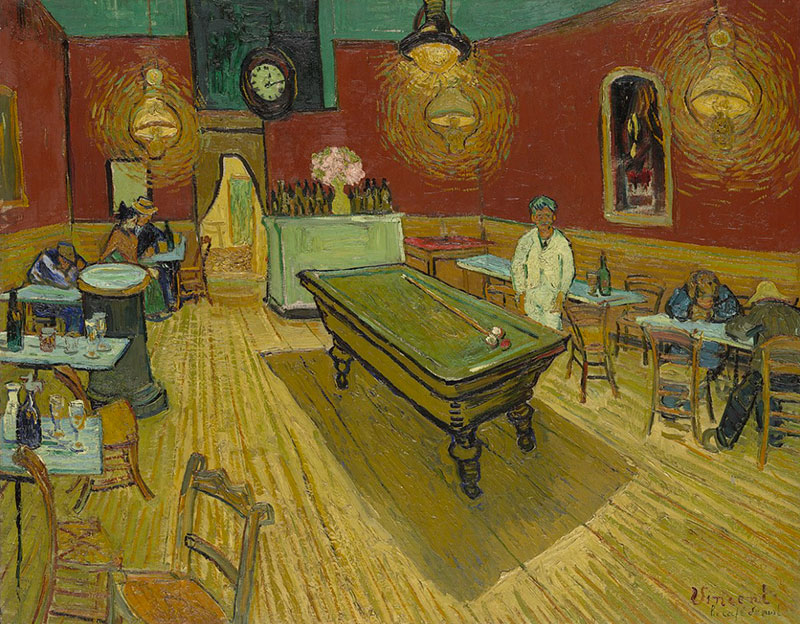
Vincent van Gogh worked with simultaneous contrast especially in Arles, pairing orange and blue directly in compositions from 1888. He wrote that complementaries at equal brightness raise each other to an intensity “so violent that human eyes will scarcely be able to bear to look at it” (M.S. Rau).
How to Test and Compensate for Simultaneous Contrast
Knowing this effect exists and knowing how to manage it are different things. Most color problems in both traditional and digital work come from decisions made in isolation that fall apart in context.
The fix isn’t complicated. It just requires a habit shift.
Testing Methods That Actually Work
The gray patch test is the most revealing diagnostic available without any software. Place your target color (or a neutral gray close to your intended value) on three surfaces: a pure white, a pure black, and your actual working background. If the swatch looks noticeably different across those three, the effect is active and strong enough to affect your final result.
For digital work:
- View designs at full scale in the actual rendered layout, never in an isolated component panel
- Desaturate the screen to check lightness relationships independently of hue
- Test every color combination on each distinct background it will appear against
- Check button and text colors on your lightest background, darkest background, and any colored sections
For paint:
- Mix test strokes directly on the primed ground or a scrap of the same surface color
- Step back to view the full composition before committing to final local colors
When to Use the Effect vs. When to Neutralize It
Not every simultaneous contrast situation needs fixing. Sometimes the shift is exactly what you want.
| Goal | Approach | Where It Works |
|---|---|---|
| Increase perceived vibrancy | Place complementary colors adjacent | Illustration, poster design, painting |
| Make a neutral look warmer | Surround it with cool hues | Interior rendering, product photography |
| Stabilize legibility | Increase luminance gap, test on all backgrounds | UI text, wayfinding, data visualization |
| Neutralize unwanted shift | Add a neutral buffer strip between adjacent hues | Textile design, print production |
Victor Vasarely and the Op Art movement did the opposite of neutralizing. They built entire compositions around maximizing simultaneous contrast and value contrast to produce movement and depth from completely flat surfaces. Vasarely’s grids of geometric shapes vibrate and appear three-dimensional precisely because adjacent color shifts are pushed to their absolute limits.
The decision is always the same: understand what the surrounding colors will do, then choose deliberately, rather than discovering the problem after the work is done.
Common Misconceptions
A few persistent misunderstandings about simultaneous contrast cause real problems in both education and practice. Worth addressing directly.
It Is Not an Optical Illusion
Simultaneous contrast gets grouped with optical illusions in most pop-science coverage. That framing is misleading.
An optical illusion involves the visual system being misled into seeing something that contradicts physical reality in a detectably “wrong” way. Simultaneous contrast is just how color perception works. There is no correct, context-free version of any color that the eye is failing to see. The perceived color is always a product of its surroundings. That is the system functioning normally, not malfunctioning.
A 2024 study published in the Journal of Imaging Science and Technology (Armellin et al.) confirmed that spatial color processing mechanisms are integral to both normal color perception and color-deficient observers alike. The spatial arrangement of colors is not a bug in human vision. It is the architecture.
Better Screens Do Not Reduce the Effect
A common assumption among digital designers: high color accuracy monitors will eliminate or reduce simultaneous contrast problems.
They will not. Monitor calibration and gamut width affect color accuracy. They have no effect on the retinal and neural mechanisms producing simultaneous contrast. A perfectly calibrated display showing two adjacent colors will produce exactly the same perceptual shift as an uncalibrated one showing the same colors.
The shift happens after the light reaches the eye. Hardware cannot intervene at that stage.
Color Vision Deficiency Does Not Remove the Effect
The 2024 research by Armellin et al. specifically tested simultaneous contrast in color-deficient observers (CDOs) versus color-normal observers (CNOs). The finding: CDOs are not exempt from the effect. Spatial color processing mechanisms operate within the visual pathways of color-deficient individuals, affecting their perception in ways classical point-wise models do not capture.
The shift differs in direction and magnitude for color-deficient observers. It does not disappear. Designing for accessibility by simply checking WCAG ratios does not account for this. The perceptual experience of a color-deficient user viewing two adjacent colors is still subject to mutual hue induction, just along different opponent channels.
This is one reason color psychology and hue relationships remain central concerns in accessible design, not just contrast ratio compliance.
FAQ on Simultaneous Contrast
What is simultaneous contrast?
Simultaneous contrast is the change in a color’s perceived hue, lightness, or saturation caused by adjacent colors. The color itself doesn’t change. Your visual system compares it against its surroundings, and that comparison shifts what you see.
Who discovered simultaneous contrast?
Michel Eugene Chevreul identified it in the 1820s while working at the Gobelins tapestry manufactory in Paris. He published his findings in 1839 in De la Loi du Contraste Simultane des Couleurs, establishing the foundation for modern color theory.
What causes simultaneous contrast?
Two mechanisms drive it: lateral inhibition in the retina, where neighboring photoreceptors suppress each other’s signals, and opponent-process color channels, which push perceived color toward the opponent of whatever surrounds it.
What is the difference between simultaneous contrast and successive contrast?
Simultaneous contrast happens in real time between two adjacent colors viewed at once. Successive contrast produces afterimages after staring at one color and looking away. Different mechanisms, different triggers. Only one happens side by side.
How does simultaneous contrast affect painting?
A color mixed on the palette can look completely different once placed on the canvas next to other hues. Value relationships shift, warm colors cool down, and neutral tones pick up cast from surrounding areas. Painters compensate by testing colors directly in context.
Did Josef Albers study simultaneous contrast?
Yes. His 1963 book Interaction of Color, published by Yale University Press, is built entirely around it. Albers demonstrated that the same color looks different on different backgrounds, making simultaneous contrast the central argument of his teaching method.
How does simultaneous contrast affect web and UI design?
A text color that passes WCAG contrast ratio checks can still appear low-contrast when placed on a colored background, because simultaneous contrast shifts its perceived lightness. Contrast tools measure luminance. They don’t simulate what the eye actually sees.
Does simultaneous contrast affect people with color blindness?
Yes. Research published in the Journal of Imaging Science and Technology (Armellin et al., 2024) confirmed that color-deficient observers experience simultaneous contrast through spatial processing mechanisms. The shift differs in direction, but it does not disappear.
Which artists used simultaneous contrast deliberately?
Georges Seurat built Pointillism around it. Henri Matisse used it in Fauvism through flat adjacent color fields. Vincent van Gogh paired complementary colors to push perceived intensity. Victor Vasarely exploited it systematically in Op Art.
How do you test for simultaneous contrast in your work?
Place a neutral gray swatch on your actual background color, then on white and black. If it looks different across all three, the effect is active. For digital work, always review color contrast at full scale in the real layout, not in isolation.
Conclusion
Simultaneous contrast isn’t a niche concept for color scientists. It’s active in every painting, every screen, every woven textile where two colors share a boundary.
Chevreul’s law, Albers’ exercises, Seurat’s dots, Matisse’s flat fields. Different eras, different painting styles, same underlying principle: perceived color is always relative to its surroundings.
Understanding the opponent-process theory and lateral inhibition doesn’t just explain why colors shift. It gives you control over color saturation, perceived tone, and visual hierarchy in ways that raw color wheel knowledge can’t.
Test your colors in context. Always. That single habit closes the gap between what you mix and what the eye actually sees.